One morning, our vulnerability monitoring system raised an alert. It looked serious. A security feed reported a vulnerability in a WordPress plugin:
wpDataTables (Premium) < 6.5.0.2 – Unauthenticated Local File Inclusion
If you’re not a security engineer, that phrase might not mean much. But to people who work with web security, it’s a red flag. LFI vulnerabilities can sometimes allow attackers to read sensitive files from a server — configuration files, credentials, or even source code.
Alerts like this cannot be ignored. So I started the investigation.
By the end of the day, after reviewing thousands of lines of code and tracing execution paths through the plugin, the conclusion was surprising:
The vulnerability existed in the code, but it wasn’t actually exploitable.
This post is the story of that investigation.
Investigation Summary
Before diving into the details, here’s the short version:
Claim: Unauthenticated Local File Inclusion
Reality: Admin-only path traversal
Impact: No file disclosure due to JSON parsing
Severity: Low
Engineering time spent: ~1 day
Now let’s see why.
Step 1: The Alert
The alert originated from a vulnerability advisory concerning the WordPress plugin wpDataTables. It was reported by Nguyen Xuan Chien on Patchstack.
The advisory claimed that versions up to a certain release contained an Unauthenticated Local File Inclusion vulnerability. In security terminology, that means an attacker could potentially make the server read arbitrary files from disk. This is typically considered a high-severity issue because it can sometimes expose sensitive information or lead to further compromise.
Naturally, alerts like this require investigation.
The typical workflow looks like this:
- Review the advisory
- Inspect the relevant code
- Verify exploitability
- Determine severity
- Deploy mitigation if necessary
So the first step was to examine the plugin source code.
Step 2: The Suspicious Code
The advisory pointed to the code responsible for loading language files used by the plugin interface.
Simplified, the logic looked like this:
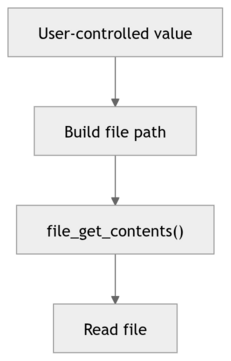
At first glance, this looks dangerous: if an attacker could control the file path, they might attempt a path traversal such as ../../../etc/passwd. This could cause the server to read a system file.
This pattern, path traversal combined with file access, is exactly how Local File Inclusion vulnerabilities often occur.
So initially, the advisory seemed plausible. But the critical question remained: Can an attacker actually control the value used to build the file path?
Step 3: Following the Data
Tracing the code revealed something important: the language file name comes from a WordPress option stored in the database. And the only place where this option can be modified is an administrator-only AJAX endpoint.
This means an attacker cannot directly change the value: they would already need administrator access to the site. At that point, they effectively control the entire WordPress installation.
So while the vulnerability is technically real, as the code really lacks proper path validation, its practical impact is very limited. And this already contradicts the advisory’s claim of “unauthenticated” exploitation.
Even if the path traversal worked, another detail limits its impact: the plugin does not return the file contents directly. Instead, it parses the file as JSON:
$obj->dataTableParams->oLanguage = json_decode(file_get_contents($this->getInterfaceLanguage()));
In plain English, the plugin expects language files that look like this:
{
    "search": "Search",
    "paginate": "Next"
}
But system files such as /etc/passwd look like this:
root:x:0:0:root:/root:/bin/bashThat is not valid JSON. And when json_decode() processes invalid JSON, it simply returns null. Fail.
Thus, even if a path traversal succeeded, the attacker would not receive the file contents. At most, they could detect whether a file exists — a minor information leak.
Step 4: The “Unauthenticated” Endpoint
The advisory also referenced an AJAX endpoint that does not require authentication. That sounded more concerning. However, further analysis revealed several hidden constraints.
The endpoint only functions if all of the following conditions are met:
- A specific table configuration already exists in the database.
- The table uses a spreadsheet data source.
- Automatic updates are enabled.
- A secret verification hash is known.
Even more importantly, the attacker cannot choose which file to load because the file location is retrieved from the database.
So while the endpoint appears risky at first glance, it does not give attackers control over the file path.
Step 5: Dynamic Includes
While reviewing the code, I also noticed another suspicious pattern. In a few places, the plugin dynamically loads PHP files using require_once() based on variable input. Specifically, this happens in the chart and column builder components. Dynamic includes are usually a red flag during security reviews because, if improperly handled, they can sometimes allow attackers to load and even execute arbitrary code. In this case, however, the filenames are constructed with a fixed format and suffix, which significantly limits what can actually be loaded. For example, the column builder generates filenames like:
$columnFormatterFileName = 'class.' . strtolower($wdtColumnType) . '.wpdatacolumn.php';
require_once($columnFormatterFileName);
and the chart builder uses a similar pattern:
$chartClassFileName = 'class.' . $constructedChartData['engine'] . '.wpdatachart.php';
require_once(WDT_ROOT_PATH . 'source/' . $chartClassFileName);
Because the filename must end with a very specific suffix (such as .wpdatacolumn.php or .wpdatachart.php), the attacker cannot simply point the include at an arbitrary file on the system. This already constrains the impact to files that follow the plugin’s internal naming convention.
Historically, attackers sometimes bypassed such restrictions using null-byte injection (for example, by appending %00 to truncate the filename), but this technique was eliminated in PHP many years ago: null bytes in file paths have been rejected since PHP 5.3 (released in 2009). In practice, that means the constructed suffix cannot be truncated.
Combined with the fact that these code paths are only reachable through administrative actions protected by capability checks and nonces, the dynamic includes do not create a realistic unauthenticated attack vector. At most, they represent a piece of defensive hardening that the later patch addressed by introducing explicit allowlists.
Step 6: The Patch
The plugin developers released a patch addressing the issue.
The update introduced several defensive checks:
basename()to remove directory traversal.- extension allowlists.
realpath()path canonicalization.- verification that files remain inside the language directory.
These are all good security practices. However, the presence of a patch does not necessarily mean the vulnerability was easy to exploit. In this case, the fix is best understood as a defense-in-depth improvement.
Final Verdict
After completing the investigation, the issue was reclassified.
| Advisory Claim | Actual Finding |
|---|---|
| Unauthenticated LFI | Admin-only path traversal |
| Arbitrary file disclosure | No disclosure due to JSON parsing |
| High severity | Low severity |
| Easily exploitable | Multiple strict preconditions |
We downgraded the score from 7.5 (High severity) to 3.1 (Low severity).
The Vulnerability Triage Iceberg
This investigation also illustrates something important about security engineering.
From the outside, vulnerability handling appears simple:
Vulnerability discovered → patch applied
But the reality is more complex.
What people see:
- Vulnerability alert;
- Patch released;
- Issue resolved.
What engineers actually do:
- Download the vulnerable version;
- Diff patched version;
- Trace call paths;
- Identify entry points;
- Verify authentication logic;
- Follow the data flow;
- Attempt proof of concept;
- Assess real impact;
- Write a triage report;
- Develop a mitigation.
Often, all of that work leads to a surprising conclusion: the vulnerability is technically present but not practically exploitable.
The Real Lesson
The bigger lesson here isn’t about this specific plugin. It’s about the hidden cost of vulnerability feeds.
Security researchers often detect suspicious code patterns, such as the ones present in this plugin. But exploitability depends on much more:
- Who controls the input;
- Authentication requirements;
- Configuration;
- Runtime behavior.
Those details often require manual analysis. In this case, confirming the true risk wasted a lot of engineering time. All to confirm that the vulnerability was overstated.
Why This Matters
Security reports are essential. They help vendors fix real issues and protect users. But when reports overstate risk or ignore exploitability constraints, they can create unnecessary work and alert fatigue. Security teams end up spending time proving that something isn’t exploitable, rather than fixing issues that actually matter.
Improving the quality of vulnerability reporting, especially automated reporting, would save significant time across the industry.
Final Thoughts
The wpDataTables code did contain a weakness: it lacked proper path validation. But the advisory description did not accurately reflect the actual attack surface.
This investigation reinforced an important lesson:
Finding vulnerable code is not the same as finding an exploitable vulnerability.
And sometimes, the most valuable security work is carefully proving the difference.