Wazuh decoders for the Uncomplicated Firewall from Ubuntu 24.04 do not work: they expect a bit different format:
<!-- UFW - Uncomplicated Firewall
Examples:
Sep 20 15:52:00 managerHost kernel: [ 2870.303541] [UFW AUDIT] IN= OUT=ppp0 SRC=117.197.243.67 DST=218.248.255.163 LEN=62 TOS=0x00 PREC=0x00 TTL=64 ID=52751 DF PROTO=UDP SPT=57548 DPT=53 LEN=42
Feb  4 23:33:37 hostname kernel: [ 3529.289825] [UFW BLOCK] IN=eth0 OUT= MAC=00:11:22:33:44:55:66:77:88:99:aa:bb:cc:dd SRC=254.253.252.251 DST=191.192.193.194 LEN=103 TOS=0x00 PREC=0x00 TTL=52 ID=0 DF PROTO=UDP SPT=53 DPT=36427 LEN=83
Dec 26 09:05:47 server01 kernel: [126140.629122] [UFW BLOCK] IN=eth0 OUT= MAC=00:11:22:33:44:55:66:77:88:99:aa:bb:cc:dd SRC=254.253.252.251 DST=191.192.193.194 LEN=52 TOS=0x02 PREC=0x00 TTL=128 ID=9209 DF PROTO=TCP SPT=17833 DPT=22 WINDOW=8192 RES=0x00 CWR ECE SYN URGP=0
-->
<decoder name="ufw">
   <type>firewall</type>
   <parent>kernel</parent>
   <prematch>^[\s*\d+.\d+] [\.*] IN=</prematch>
   <regex>^[\s*\d+.\d+] [(UFW \.*)] \.+ SRC=(\S+) DST=(\S+)</regex>
   <regex> \.+ PROTO=(\w+) </regex>
   <order>action,srcip,dstip,protocol</order>
</decoder>

<decoder name="ufw">
   <type>firewall</type>
   <parent>kernel</parent>
   <regex offset="after_regex">^SPT=(\d+) DPT=(\d+) </regex>
   <order>srcport,dstport</order>
</decoder>
Ubuntu (24.04; I haven’t checked other versions) UFW writes logs differently:
2025-12-07T02:04:29.142207+00:00 vm3378454 kernel: [UFW BLOCK] IN=ens3 OUT= MAC=52:54:00:c9:6d:d2:84:b5:9c:6d:0f:c2:08:00 SRC=45.33.112.95 DST=103.71.20.92 LEN=40 TOS=0x00 PREC=0x00 TTL=239 ID=4529 PROTO=TCP SPT=60001 DPT=30273 WINDOW=1024 RES=0x00 SYN URGP=0
2025-12-07T02:04:48.662047+00:00 vm3378454 kernel: [UFW BLOCK] IN=ens3 OUT= MAC=52:54:00:c9:6d:d2:84:b5:9c:6d:0f:c2:08:00 SRC=108.167.178.116 DST=103.71.20.92 LEN=40 TOS=0x00 PREC=0x00 TTL=237 ID=51191 PROTO=TCP SPT=60000 DPT=23512 WINDOW=1024 RES=0x00 SYN URGP=0
2025-12-07T02:05:06.085536+00:00 vm3378454 kernel: [UFW BLOCK] IN=ens3 OUT= MAC=52:54:00:c9:6d:d2:84:b5:9c:6d:0f:c2:08:00 SRC=79.124.62.230 DST=103.71.20.92 LEN=44 TOS=0x00 PREC=0x20 TTL=248 ID=48161 PROTO=TCP SPT=52876 DPT=24067 WINDOW=1025 RES=0x00 SYN URGP=0
You can see that in Ubuntu, there is no timestamp before the [UFW BLOCK] marker. This makes the prematch rule fail.
Luckily, this is easy to fix with custom matchers. Put this code into /var/ossec/etc/decoders/local_decoder.xml:
<decoder name="my_ufw">
    <parent>kernel</parent>
    <type>firewall</type>
    <prematch>[UFW \w+]</prematch>
    <use_own_name>true</use_own_name>
    <regex>[UFW (\w+)]</regex>
    <order>action</order>
</decoder>

<decoder name="my_ufw">
    <type>firewall</type>
    <parent>kernel</parent>
    <regex>SRC=(\S+)</regex>
    <order>srcip</order>
</decoder>

<decoder name="my_ufw">
    <type>firewall</type>
    <parent>kernel</parent>
    <regex>DST=(\S+)</regex>
    <order>dstip</order>
</decoder>

<decoder name="my_ufw">
    <type>firewall</type>
    <parent>kernel</parent>
    <regex>SPT=(\S+)</regex>
    <order>srcport</order>
</decoder>

<decoder name="my_ufw">
    <type>firewall</type>
    <parent>kernel</parent>
    <regex>DPT=(\S+)</regex>
    <order>dstport</order>
</decoder>

<decoder name="my_ufw">
    <type>firewall</type>
    <parent>kernel</parent>
    <regex>PROTO=(\S+)</regex>
    <order>protocol</order>
</decoder>
I did not found any rules dedicated to ufw. However, there are generic rules in 0900-firewall_rules.xml:
<group name="firewall,">
  <rule id="4100" level="0">
    <category>firewall</category>
    <description>Firewall rules grouped.</description>
  </rule>

  <!-- We don't log firewall events, because they go
    -  to their own log file.
    -->
  <rule id="4101" level="5">
    <if_sid>4100</if_sid>
    <action>DROP</action>
    <options>no_log</options>
    <description>Firewall drop event.</description>
    <group>firewall_drop,pci_dss_1.4,gpg13_4.12,gdpr_IV_35.7.d,hipaa_164.312.a.1,nist_800_53_SC.7,tsc_CC6.7,tsc_CC6.8,</group>
  </rule>

  <rule id="4151" level="10" frequency="18" timeframe="45" ignore="240">
    <if_matched_sid>4101</if_matched_sid>
    <same_source_ip />
    <description>Multiple Firewall drop events from same source.</description>
    <group>multiple_drops,pci_dss_1.4,pci_dss_10.6.1,gpg13_4.12,gdpr_IV_35.7.d,hipaa_164.312.a.1,hipaa_164.312.b,nist_800_53_SC.7,nist_800_53_AU.6,tsc_CC6.7,tsc_CC6.8,tsc_CC7.2,tsc_CC7.3,</group>
  </rule>
</group>
Rules 4101 and 4151 trigger only when action is DROP. For uwf, action can either be AUDIT or BLOCK (or UFW AUDIT/UFW BLOCK if we follow the logic of the original decoder rules).
Again, we can fix this with custom rules. Add this code to /var/ossec/etc/rules/local_rules.xml:
<group name="local,firewall,">
  <rule id="104101" level="5">
    <if_sid>4100</if_sid>
    <action>BLOCK</action>
    <options>no_log</options>
    <description>Firewall block event.</description>
    <group>firewall_drop,pci_dss_1.4,gpg13_4.12,gdpr_IV_35.7.d,hipaa_164.312.a.1,nist_800_53_SC.7,tsc_CC6.7,tsc_CC6.8,</group>
  </rule>

  <rule id="104151" level="10" frequency="18" timeframe="45" ignore="240">
    <if_matched_sid>104101</if_matched_sid>
    <same_source_ip />
    <description>Multiple Firewall block events from same source.</description>
    <group>multiple_drops,pci_dss_1.4,pci_dss_10.6.1,gpg13_4.12,gdpr_IV_35.7.d,hipaa_164.312.a.1,hipaa_164.312.b,nist_800_53_SC.7,nist_800_53_AU.6,tsc_CC6.7,tsc_CC6.8,tsc_CC7.2,tsc_CC7.3,</group>
  </rule>
</group>
And restart wazuh:
sudo systemctl restart wazuh-manager
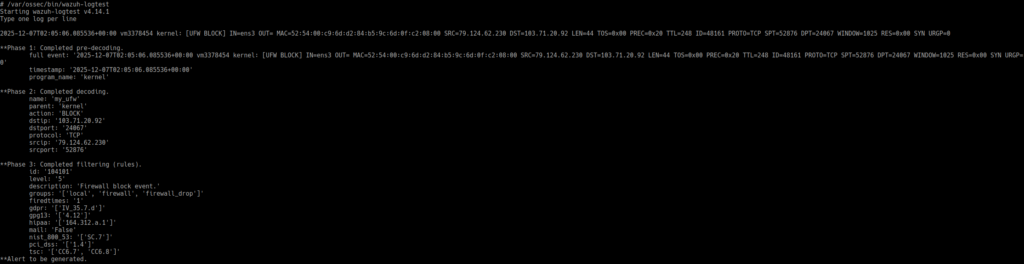
We can use wazuh-logtest to test our rules:
References
- pci_dss_1.4: 1.4 Install personal firewall software or equivalent functionality on any portable computing devices (including company and/or employee-owned) that connect to the Internet when outside the network (for example, laptops used by employees), and which are also used to access the CDE. Firewall (or equivalent) configurations include:
- Specific configuration settings are defined.
- Personal firewall (or equivalent functionality) is actively running.
- Personal firewall (or equivalent functionality) is not alterable by users of the portable computing
devices.
- pci_dss_10.6.1: 10.6.1 Review the following at least daily:
- All security events
- Logs of all system components that store, process, or transmit CHD and/or SAD
- Logs of all critical system components
- Logs of all servers and system components that perform security functions (for example, firewalls,
intrusion-detection systems/intrusion-prevention systems (IDS/IPS), authentication
servers, e-commerce redirection servers, etc.).
- gpg13_4.12: Recording of workstation, server or device status.
- gdpr_IV_35.7.d: The assessment shall contain at least the measures envisaged to address the risks, including safeguards, security measures and mechanisms to ensure the protection of personal data and to demonstrate compliance with this Regulation taking into account the rights and legitimate interests of data subjects and other persons concerned.
- hipaa_164.312.a.1: Implement technical policies and procedures for electronic information systems that maintain electronic protected health information to allow access only to those persons or software programs that have been granted access rights as specified in § 164.308(a)(4).
- hipaa_164.312.b: Implement hardware, software, and/or procedural mechanisms that record and examine activity in information systems that contain or use electronic protected health information.
- nist_800_53_SC.7: Boundary Protection. Monitor and control communications at the external managed interfaces to the system and at key internal managed interfaces within the system.
- nist_800_53_AU.6: Audit Review, Analysis, and Reporting: Review and analyze system audit records.
- tsc_CC6.7: The entity restricts the transmission, movement, and removal of information to authorized internal and external users and processes, and protects it during transmission, movement, or removal to meet the entity’s objectives.
- tsc_CC6.8: The entity implements controls to prevent or detect and act upon the introduction of unauthorized or malicious software to meet the entity’s objectives.
- tsc_CC7.2: The entity monitors system components and the operation of those components for anomalies that are indicative of malicious acts, natural disasters, and errors affecting the entity’s ability to meet its objectives; anomalies are analyzed to determine whether they represent security events.
- tsc_CC7.3: The entity evaluates security events to determine whether they could or have resulted in a failure of the entity to meet its objectives (security incidents) and, if so, takes actions to prevent or address such failures.